Usability testing
PRe-testing legwork to capture what patterns and questions we want to un-cover
Preface
Inform the participant that they are an Engagement Manager searching for Talent for a role.
Part 1: Identifying Eligibility
-
Can you tell me if the two listed talents here, Rakesh and Rex, are eligible?
-
Do you have an idea of what ‘eligibility’ may mean in this context?
-
If you wanted more information about their eligibility, what might you do to get there?
-
[Direct to hover if they haven’t made it there]
Part 2: Evaluating Eligibility
-
After viewing the information in the hover, do you feel like you have a better understanding of the Talent’s eligibility?
-
How would you rate your understanding of the Talent’s eligibility?
-
If you were highly interested a Talent that was marked as not eligible, would you dismiss them as a candidate? Why or why not?
Documentation
Detailed design documentation ensured seamless handoff to developers and alignment across the product and business teams. This included component libraries, accessibility specs, and annotated flows for responsive layouts.
Turning usability questions into full sentence printouts make them usable as a script and documentation tool. Three birds one stone!


PwC Talent Exchange
Role
UX design lead
Timeline
2 years
Team
Cross-functional team:
PO, PM, UX designers,
Engineers, QAs
Platform
Responsive web
iOS native app
Android native app
Skills
Visual design guideline
Interview
Prototyping
Usability testing
Background
PwC Talent Exchange is a digital staffing platform designed to connect independent contractors and freelancers with project opportunities at PwC. The system empowers the engagement team to manage assignments efficiently—tracking performance, reviewing candidate history, and maintaining visibility across ongoing projects.
As the UX design lead, I focused on creating a unified experience that supports both talent discovery and engagement management, ensuring transparency and usability across the entire workflow.

UX flow production
Following PwC’s design thinking methodology, the UX process moved through four key phases: Empathize, Define, Ideate, Prototype and Test.
Through early stakeholder interviews, I learned that engagement managers struggled with fragmented tracking tools and limited insights into contractor performance. These insights shaped the core design challenge: How might we simplify the process of finding, evaluating, and managing external talent while maintaining PwC’s standards of quality and compliance?

These personas helped ensure the platform addressed varying levels of technical comfort, engagement frequency, and professional expertise. These four personas captured the full spectrum of end users—from internal engagement teams to external freelance professionals—helping the design strategy balance operational efficiency with user empowerment at every experience level.
Personas

User Journey
Mapping the end-to-end journey revealed moments of friction—especially during contractor onboarding and post-project review. These insights highlighted opportunities for automation, clearer feedback mechanisms, and integrated tracking within the dashboard.

Sitemap
I restructured the platform’s architecture to reduce redundant paths and surface key functions like Job Matching, Project Tracking, and Performance Review. This clarity ensured managers could complete critical tasks in fewer clicks.


Sketches
Early sketches explored different ways to visualize complex data, such as project timelines, candidate profiles, and performance summaries.
Through collaborative sketching sessions with stakeholders, I was able to quickly align on layout direction and interaction flow. This stage encouraged experimentation and helped translate business goals into tangible design ideas.


Digital Wireframe
Transitioning to digital wireframes, I focused on refining hierarchy and usability.
-
Dashboard screens were simplified to present key metrics upfront.
-
Filters and sorting tools were added to make large datasets manageable.
-
Visual indicators—such as color-coded statuses—provided instant clarity.
These low-fidelity prototypes formed the foundation for usability testing and stakeholder validation.


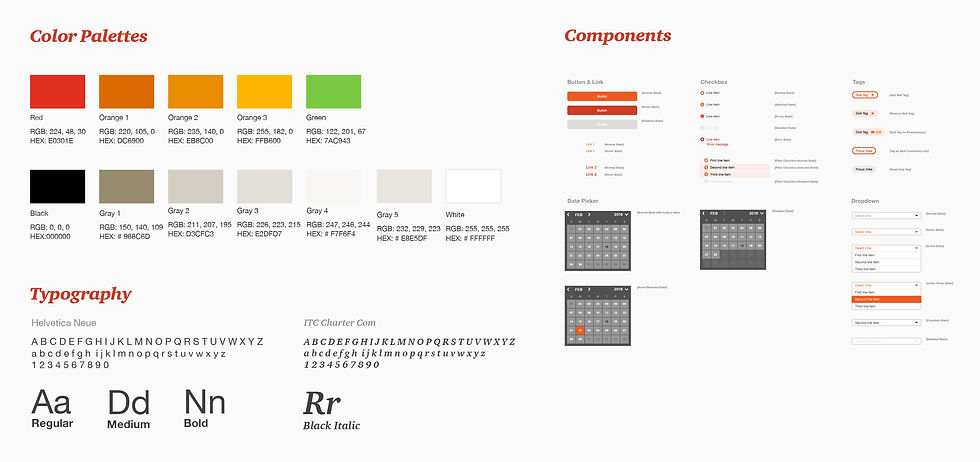
The final design integrated PwC’s global brand standards—balancing corporate professionalism with approachability.
-
Color Palette: Adapted PwC’s orange with a neutral supporting palette for clarity.
-
Typography: Modern sans-serif for data-heavy views and improved readability.
-
Components: Designed flexible modules for candidate profiles, engagement dashboards, and review summaries.
Finalize design solutions
High-fidelity Prototype
This is a placeholder, short description
Project 02


Responsive web

Native app
Challenges
The opportunities we uncovered emerged from our research — including moderate interviews, opportunities workshop, and affinity mapping.
We prioritize which ones were most feasible and valuable to solve.
1
Mapping the business goals with end-users’ needs
2
Dozens features and hundreds screenshot finished in 4 months
3
Collaboration among designers, ensuring the consistent design language
4
Enhancing the communication